How to Get Your Substack Posts to Show Up on Google
Substack posts invisible on Google? The GTM-bridge verification for Search Console, /feed as your sitemap, and what it unlocks.
A Bangkok dentist spent every Sunday writing a newsletter — practical guides on implants, whitening, what a fair price looks like. Six months in, she searched Google for her own article title. Nothing. Her words existed, subscribers read them, but to Google her newsletter was invisible.
If you publish on Substack and your posts don't show up in Google search, the problem is almost never your writing. It's a technical handshake that never happened. 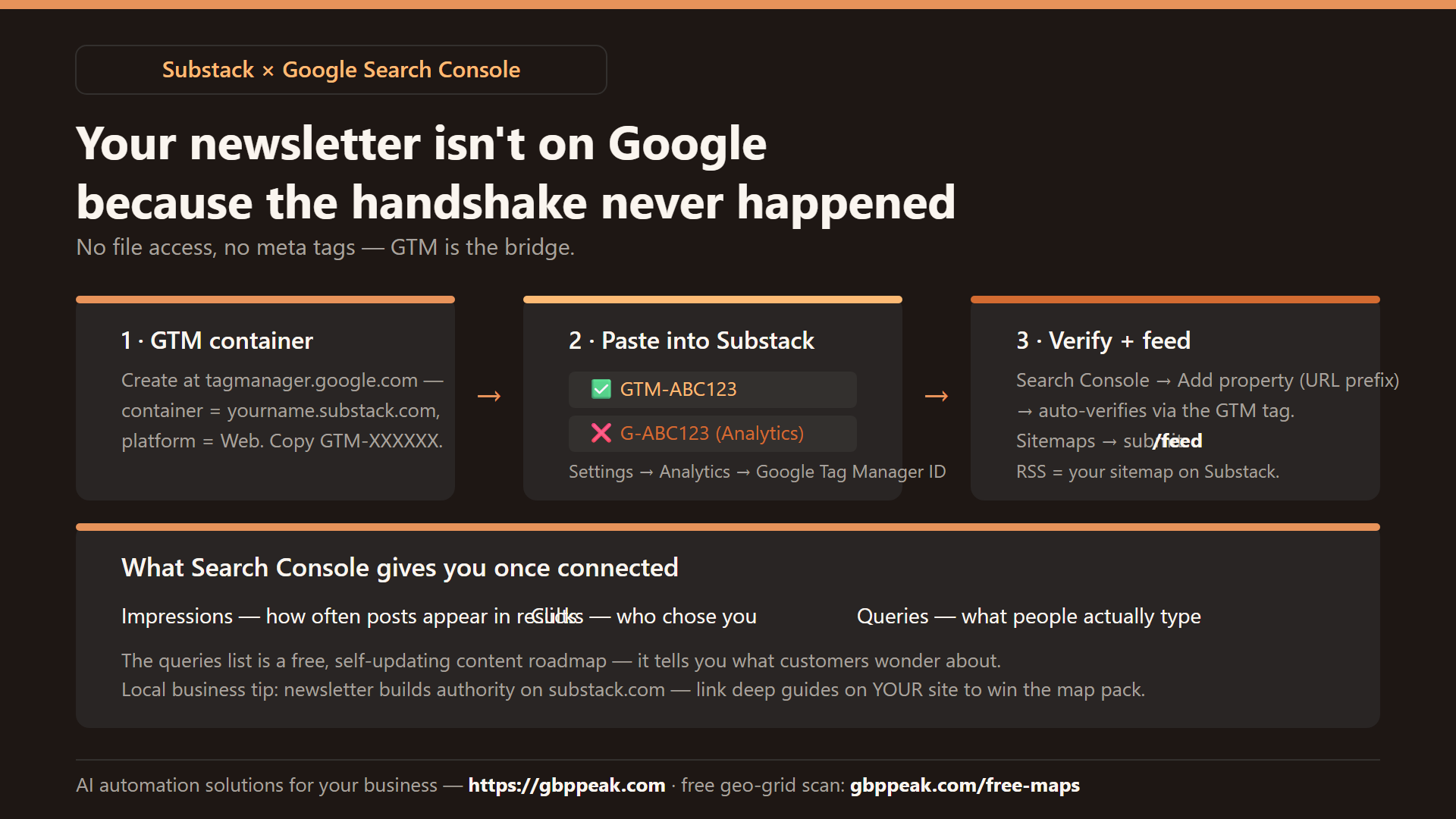
This guide walks through it — and through the one weird workaround (Google Tag Manager) that makes verification possible on a platform you don't control.
To get Substack posts on Google, connect your publication to Google Search Console. Substack doesn't let you upload verification files or edit backend code, so you verify through Google Tag Manager instead: create a GTM container, paste its GTM-XXXXXX ID into Substack's Settings → Analytics, then add your Substack URL in Search Console — it auto-verifies via the tag. Finally submit /feed (your RSS feed) as a sitemap so Google can discover every post. Expect indexing within days to weeks. :::
Why Substack hides from Google
Three reasons your posts might not be appearing:
- Indexing delay — Google hasn't found your pages yet. Crawlers discover new links gradually; a new publication with no inbound links can wait a long time.
- No Search Console connection — without Google Search Console (GSC), you can't see whether Google is crawling you at all, or request indexing, or catch errors.
- No backend access — Substack is a managed platform. You can't upload an HTML verification file or edit headers, which is how every standard verification method works.
That third point is the whole puzzle. Solving it takes one detour.
The verification hurdle (and the GTM bridge)
To add a site to Search Console, Google needs proof you own it. On a normal website you'd upload a file or paste a meta tag into the page code. Substack gives you neither.
The workaround: Google Tag Manager. GTM is Google's tool for managing tracking codes from one place — and when its tag runs on a site, Google treats that as proof of control. Substack lets you paste a GTM ID into your settings, and that becomes your ownership key.
| Method | Normal website | Substack |
|---|---|---|
| Upload HTML file | ✅ works | ❌ no file access |
Meta tag in <head> |
✅ works | ❌ no code access |
| DNS TXT record | ✅ works | ⚠️ only on a custom domain |
| Google Tag Manager tag | ✅ works | ✅ the practical path |
The full setup, step by step
Step 1 — Create a Google Tag Manager container
Go to tagmanager.google.com, create a free account, and set up a container:
- Account name: anything (your brand)
- Container name: your Substack URL, e.g.
yourname.substack.com - Platform: Web
You'll get an ID like GTM-ABC123. Copy it.
Step 2 — Paste the GTM ID into Substack
In Substack: Settings → Analytics → Google Tag Manager ID. Paste GTM-ABC123 and save.
Two classic mistakes happen here:
❌ G-ABC123      ← that's a Google Analytics ID, wrong tool
❌ https://...   ← that's a URL, not an ID
✅ GTM-ABC123    ← Tag Manager ID, starts with GTM-
Analytics and Tag Manager are different products. Analytics tracks visitors; Tag Manager manages and verifies tags. Substack's field wants the manager.
Step 3 — Add the property in Search Console
At search.google.com/search-console, click Add property → URL prefix, and enter your full Substack URL: https://yourname.substack.com.
Step 4 — Let it auto-verify
Search Console will detect the GTM tag running on your Substack and verify the property automatically. No code, no files. If it doesn't verify immediately, publish or preview any post (the tag only runs where pages render) and retry after an hour.
Step 5 — Submit your RSS feed as the sitemap
Substack doesn't generate a standard sitemap.xml, but your RSS feed lists every post — a perfectly good discovery map:
In Search Console:
  Sitemaps → Add a new sitemap → enter:  /feed  → Submit
Step 6 — Request indexing for key posts
For your most important posts, use URL Inspection → Request Indexing. It's a nudge, not a guarantee — but for a new publication with few external links, it's often the difference between "found in 6 weeks" and "found in 6 days."
What you get once connected
Within days to weeks, your GSC dashboard fills with the only honest data about your search visibility:
- Impressions — how often your posts appeared in results
- Clicks — who chose you
- Queries — the exact phrases people typed to find you
For a Bangkok business newsletter, that queries list is quietly strategic: it tells you what potential customers actually wonder about ("คอนโด ฟอกฟัน ราคา", "implant vs bridge cost") — a free, self-updating content roadmap.
A local-business angle worth knowing
If your newsletter is part of a local business (clinic, gym, real estate), one structural note: Substack content builds your topical authority, but the domain is substack.com — the ranking credit mostly flows to their domain, not your business site. The strongest pattern is a newsletter that discusses topics and links to the deep guides on your own site. Substack wins subscribers; your site wins the map pack. Use each for what it does best.
And if your main site targets Bangkok customers, remember search visibility is two-dimensional: what your pages say, and where you appear on the map. Check your geographic footprint with a free geo-grid scan at https://gbppeak.com/free-maps — it plots your Google Maps ranking across your whole service area, grid point by grid point.
Frequently Asked Questions
Why can't I use my Google Analytics ID in Substack's field?
Analytics (G-…) and Tag Manager (GTM-…) are different tools. Analytics measures traffic; Tag Manager manages and verifies tracking tags. Search Console verification works through Tag Manager, so Substack's field must contain a GTM ID.
Why submit /feed instead of sitemap.xml?
Standard sites ship a sitemap.xml listing every page. Most Substack publications don't generate one, but the RSS feed at /feed lists every post — Search Console accepts it as a sitemap and discovers your content from there.
How long until my posts show up on Google?
Usually a few days to a few weeks after connecting GSC and submitting the feed. Requesting indexing via URL Inspection on key posts speeds up the first crawl; steady publishing and a few external links speed up everything after that.
Does this hurt or help if I also have a business website?
It neither hurts nor replaces your website. Substack posts build topical authority on substack.com; your own site's pages build your business's rankings. Link the newsletter to your site's guides so readers — and search engines — connect the two.