
The Two-Layer AI Automation System: Decide First, Then Build
47 requested workflows, 3 built per quarter. Split AI into an intake layer (what to build) and an execution layer (build it right) — speed without losing standards.
A Bangkok agency's automation backlog told a familiar story: 47 requested workflows, 3 built this quarter. Every request — from "auto-reply to quote emails" to "sync bookings to accounting" — went into the same queue, got the same manual triage, and waited the same three weeks. The bottleneck wasn't builders. It was deciding what deserved building, and then building each one from a blank page.
The pattern that broke that logjam comes from enterprise software teams: a two-layer AI system. Layer one decides whether and what to build. Layer two builds it, following a written rulebook. 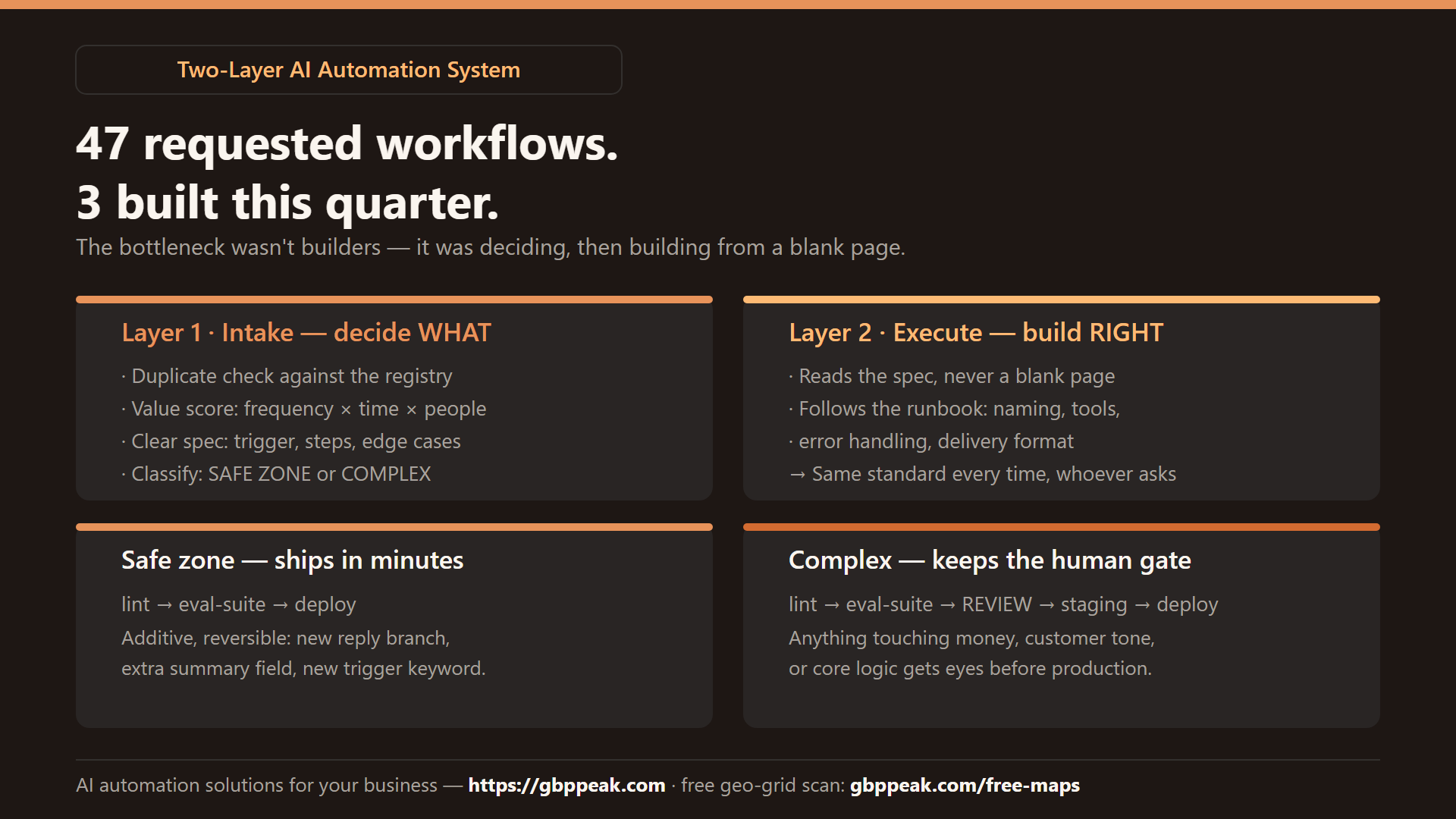
It works for a five-person agency as well as for a Salesforce department — the idea scales down beautifully.
A two-layer AI automation system splits work into qualification and execution. Layer one, an intake agent, checks each request against existing tools and docs, scores its value, and turns it into a clear specification. Layer two, an execution agent, builds from that spec while following a runbook — a written file of naming conventions, tool preferences, error handling, and delivery steps — so every output is consistent regardless of who triggered it. Low-risk changes go through automated checks and ship fast; complex ones still get human review. The result: speed without losing standards. :::
Why one AI doing everything fails
Most small teams that "use AI" run a single chat window: someone types "build me an auto-reply for quote emails" and accepts whatever comes out. Three failure modes follow:
- Duplicate work — the request was already fulfilled nine months ago, nobody checked
- Blank-page inconsistency — each automation is built in a different style, so nobody can maintain anyone else's
- No filter — someone spends a day automating a task done twice a year
One AI layer optimizes for answering. Two layers optimize for deciding, then doing it the same way every time.
| Problem | Single-layer chat | Two-layer system |
|---|---|---|
| Duplicate requests | Built again | Intake layer checks the registry first |
| Vague ideas | Built vaguely | Spec written and approved before building |
| Consistency | Depends on the prompter | Runbook enforces one standard |
| Reviewer load | Everything reviewed | Safe-zone items auto-validated |
| Priority | Loudest requester wins | Scored (impact × frequency) before queueing |
Layer one: the intake agent
The first layer is triage. It intercepts every incoming request and does four things before a human builder spends a minute:
INTAKE(request):
  1. duplicate check  → search the automation registry + docs:
                        does something like this already exist?
  2. value score      → frequency × time-saved × people affected;
                        drop anything used less than weekly
  3. spec draft       → trigger, data in/out, steps, edge cases,
                        what it must NEVER do
  4. classification   → SAFE ZONE (additive, reversible)
                        or COMPLEX (touches money, customers, logic)
The spec is the deliverable. A good spec means the execution layer starts from a map, not a vibe. Notice step 4 — it decides the release path, which is where the speed comes from.
Layer two: the execution agent and its runbook
The second layer receives the spec and builds — but never from a blank page. It follows a runbook: a file of your project's laws. Ours at gbppeak covers things like naming (<purpose>-<channel>-v<n>), tool preference (n8n over cron scripts for anything with credentials), error handling (every branch posts to the error channel, no silent fails), and delivery format (a summary of what changed and how to roll it back).
# runbook.yaml — the laws your builder AI follows
naming: "<purpose>-<channel>-v<n>"        # quote-reply-line-v2
tool_preference:
  workflows: n8n            # anything touching credentials/APIs
  one-off_scripts: tsx      # local data transforms
error_handling: "every failure path notifies #automation-errors"
delivery:
  - summary of changes (3 lines max)
  - rollback instruction (one command)
  - test evidence: 3 sample inputs passing
forbidden:
  - storing customer PII in logs
  - sending customer-facing messages without a draft step
The runbook is why consistency survives staff turnover: the standard lives in the file, not in anyone's head. It's also why reviews get fast — every output arrives in the same shape, so the reviewer checks substance, not formatting.
Safe zones and the two-speed release path
Not everything deserves a human review queue. Split your changes:
- Safe zone — additive and reversible: a new auto-reply branch, an extra field in the weekly summary, a new keyword trigger. Automated checks pass → it ships. A rollback is one revert.
- Complex path — anything touching money, customer-facing tone, or core logic: automated checks → human review → test environment → production, with a dedicated final review.
release_paths:
  safe_zone:    [lint, eval-suite, deploy]              # ~minutes
  complex:      [lint, eval-suite, REVIEW, staging, deploy]   # human gate
This is where the velocity actually comes from — not from removing humans, but from never spending human attention on changes that can't hurt anything. The quote-email auto-reply doesn't need an architect. The payment-reconciliation flow does.
What you need before building this
The honest prerequisites — you cannot automate a messy process:
- A manual process that already works. The two-layer system amplifies whatever process you have; garbage in, automated garbage out.
- A written registry — one page listing every automation that exists, what it does, where it runs. The intake layer can't check for duplicates without it.
- An opinionated runbook — "write a good workflow" is worthless; "name it this, use n8n, notify on failure, deliver with a rollback line" is a standard.
- Basic automated checks — even three sample inputs that must pass (see our guide to AI workflow evals) turns "looks fine" into "passed the gate."
A concrete first month
- Week 1: write the runbook (an afternoon) and the automation registry (list what exists today)
- Week 2: stand up the intake layer — a form plus an AI that returns spec + classification per request
- Weeks 3–4: route safe-zone builds through the execution agent; keep complex ones manual, but build them from the AI's spec
Teams that do this typically watch their build rate triple in a quarter — not because anyone works faster, but because the queue stops being clogged with duplicates, trivia, and blank pages.
And if the automations you're queueing up include anything that touches how customers find you: start from the map. A free geo-grid scan at https://gbppeak.com/free-maps shows where your Google Maps ranking stands across your service area — the highest-value "spec" you'll write all month.
Frequently Asked Questions
Does the AI work without human oversight?
No — and it shouldn't. Humans set the runbook, review complex changes, and own the final call on anything customer-facing or financial. The system removes drudgery, not accountability.
What exactly is a runbook?
A file of project laws your execution AI reads before building: naming conventions, tool preferences, error-handling rules, delivery format, and forbidden actions. It's why every automation comes out consistent no matter who requested it.
Why do safe zones matter so much for speed?
Low-risk additive changes (a new reply branch, an extra summary field) make up most requests but historically wait in the same review queue as risky ones. Auto-validating them means teams stop waiting days for changes that can't break anything — while complex work keeps full human review.
Can a two-person team use this, or is it enterprise-only?
The pattern scales down — in a two-person team you are both the architect and the requester, and the layers collapse into an intake prompt template plus a runbook file. The consistency and duplicate-check benefits start immediately.