From Business Card to Catalog: The GBP Products Section
List specific services with descriptions, prices, and deep links on your Google profile — item-level entries win the specific searches categories never match.
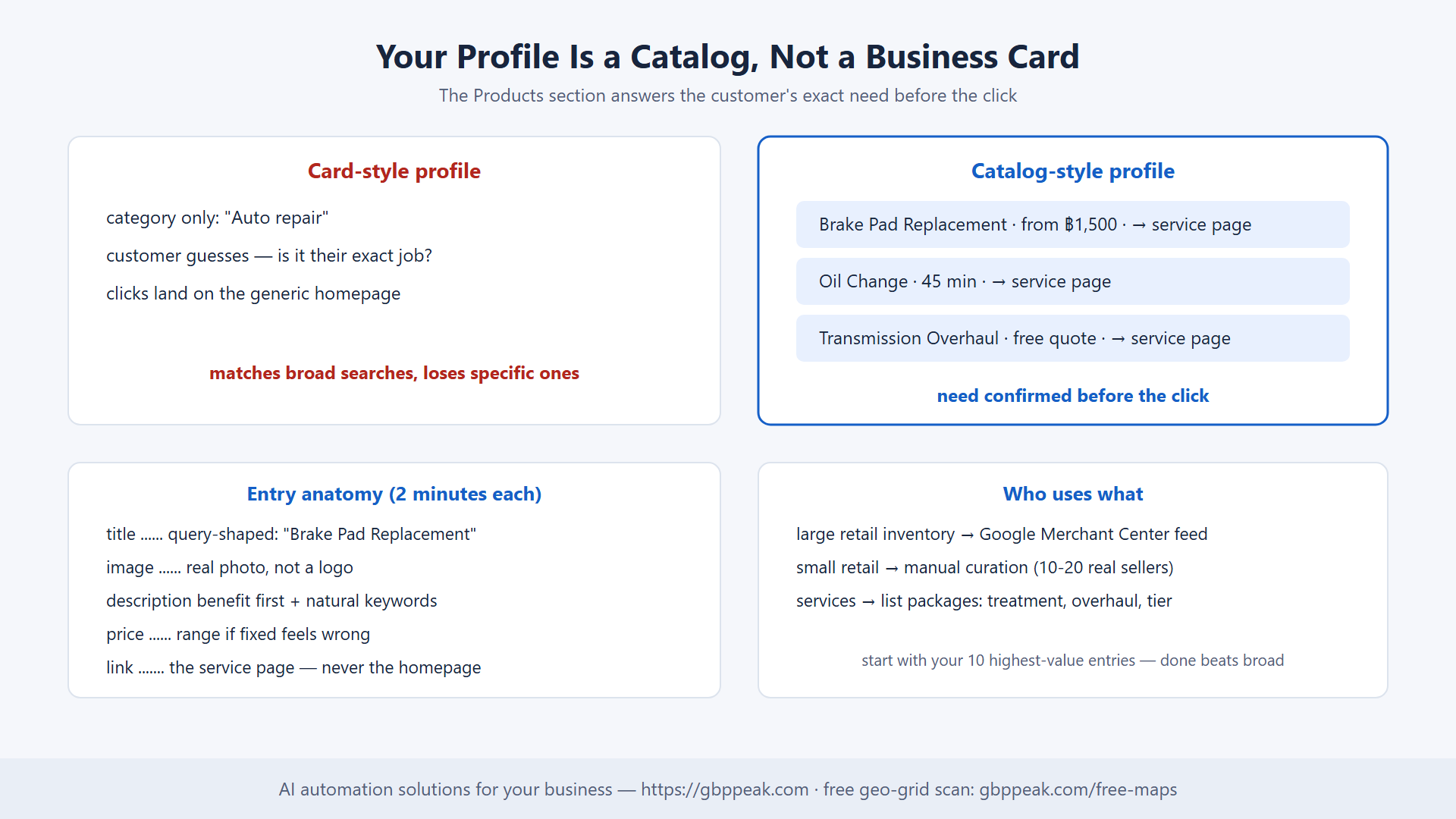
A customer searches "brake pad replacement near me" and taps a garage's profile. The profile shows a phone number, hours, and a category that says "Auto repair" — nothing about brakes. The customer cannot tell whether this garage does the specific job they need, so they back out and tap the next one, whose profile lists "Brake Pad Replacement," "Oil Change," and "Transmission Overhaul" as distinct entries with descriptions and prices.
Same search. Same city. One profile answered the question before the click; the other made the customer guess. That difference is the Products section of a Google Business Profile — the most underused high-intent surface in local search.
The Products section of a Google Business Profile lets you list specific items or services directly on your profile, each with a title, image, description, price, and a link. This improves local SEO by telling Google exactly what you offer — specific terms like "brake pad replacement" or "organic dog food" increase profile relevance for those queries — and it converts better because customers see their exact need addressed before clicking. Service businesses can list service packages the same way, and retailers can scale via Google Merchant Center integration.
Business Card vs Catalog
Most profiles are digital business cards: name, phone, hours — enough to earn a call, maybe. The Products section turns the profile into an interactive catalog, and that shift matters at the exact moment of decision.
| Card-style profile | Catalog-style profile | |
|---|---|---|
| What customer sees | "Auto repair" | Brake jobs, oil changes, overhauls — itemized |
| Specific queries matched | Broad only | "brake pad replacement" exactly |
| Pre-click clarity | Customer guesses | Need confirmed, price visible |
| Click destination | Homepage (generic) | Service-specific landing page |
| Relevance signal to Google | Category-level | Item-level keywords |
That last row is the ranking mechanics: when Google reads "100% organic dog food" or "emergency plumbing" in your product entries, the algorithm understands your offering at the query level, not just the category level — and matches you to those searches accordingly. It is the same specificity principle as one-page-one-keyword from building an inbound lead engine, applied inside the profile itself.
Retail vs Services: Two Paths
Google's handling of retail products is shifting toward Google Merchant Center — the tool that uploads your product catalog and displays items automatically across Google surfaces. For boutiques, hardware stores, and anyone with a large physical inventory, a Merchant Center-linked feed is becoming the standard.
For everyone else, the direct Products section remains open and powerful — especially for service businesses:
who_uses_what:
  retail_large_inventory:
    path: "Google Merchant Center feed"
    why: "automated sync, scales to hundreds of items"
  retail_small:
    path: "manual Products entries"
    why: "curate the 10-20 items that actually sell locally"
  service_businesses:
    path: "manual 'service package' entries"
    why: "capture traffic for specific jobs, not just the trade"
The service-business play
A salon does not sell products — so it lists treatments. A landscaper lists maintenance packages. A mechanic lists "Transmission Overhaul" with a description, a price range, and — critically — a link to the transmission page on the website, not the homepage. Each entry is a small funnel pointed at exactly the buyer it suits.
Distinguish it from the Services section too: Services are the broad categories ("Roofing"); Products entries are the granular, describable, priceable offers ("Metal Roofing Options," "Shingle Replacement Package") — the granularity that matches how customers actually search.
Writing Descriptions That Rank and Sell
The description field is where both the algorithm and the customer get persuaded. Three rules:
- Be descriptive, not bare — not "Tires" but "All-Season Performance Tires."
- Lead with the benefit — what the customer gets, in the first sentence.
- Natural language — not "Best price fast service!!" but "Quick installation and reliable service for all major tire brands."
entry anatomy (2 minutes each):
  title ......... specific, query-shaped ("Brake Pad Replacement")
  image ......... real photo, not a logo
  description ... benefit first + 1-2 natural keyword phrases
  price ......... range if fixed prices feel wrong
  link .......... the service page, never the homepage
Every element takes minutes and compounds indefinitely — the catalog logic of the sustainable local SEO cycle, where profile completeness and specificity keep paying quarter after quarter.
The Professional Setup, In Order
- Pick high-value items only. Start with your most-searched services and highest-margin products — the ten entries that answer real demand, not the whole inventory.
- Build complete entries. Title, real photo, benefit-led description, price, deep link. Ten excellent entries beat forty stubs.
- Link to specific pages. Each entry should land the customer on a page about that exact item — and if that page does not exist yet, you have just found your next content task.
- Keep it true. Remove out-of-stock items and retired services promptly; a catalog that lies costs calls and trust.
# audit order (an afternoon, once):
1. list your top 10 services by search demand / margin
2. check which already have website pages (deep links)
3. write the 10 entries (title+photo+description+price+link)
4. add to profile, in the order customers care about
5. next month: check profile insights — which entries get viewed/tapped?
Then measure it the way that matters: does the profile (and the site pages it feeds) move in the map pack across your service area? A free geo-grid scan at gbppeak.com/free-maps shows rank district by district, so the Products section gets judged by bookings, not by how pretty the catalog looks.
FAQs
Can service-based businesses use the Products section?
Yes. Despite the name, it accepts service offerings, packages, and menu items. Listing "Bridal Hair & Makeup Package" or "Transmission Overhaul" captures search traffic for those specific jobs — far easier to win than the generic trade terms — and shows customers their exact need before they click.
What is the difference between the Products and Services sections?
Services lists the broad categories of work you perform; Products is the granular layer underneath — specific, describable, priceable offers with their own pages and photos. A contractor might list "Roofing" as a service and use Products for "Metal Roofing Options" and "Shingle Replacement Packages."
Is Google Merchant Center required?
No. Merchant Center is the preferred route for retailers with large inventories who want automated syncing across Google surfaces. Small local businesses and service providers can still curate products manually — and for a ten-item curated catalog, manual is often better because you control exactly what represents you.
How many product entries should a local business create?
Start with your ten highest-value items — most-searched services or best-margin products — and do them completely (photo, description, price, deep link). Ten excellent entries outperform dozens of empty ones, and profile insights will tell you which deserve clones in other service areas.
From Business Card to Catalog
The Products section is the cheapest catalog you will ever publish: free placement on the surface where high-intent customers are already comparing options. Itemize what you actually sell, describe it for humans, point each entry at its own page, and keep it honest. Start with ten entries this week — and see the before/after where it counts, with a free geo-grid scan at gbppeak.com/free-maps.